Pre-release Documentation for Ascent Direct Booking. Not yet approved for commercial release. View availability details
The customer booking
Read the new-customer prerequisite before using the screenshots. The 26 October date, the 27 October times, and the 28 October confirmation are different selections.
On this page
- Read this before the booking exercise
- Choose the service, date, and time
- Confirm with a prepared signed-in customer
- Match the visit as the owner
- Readiness
Read this before the booking exercise
- Role
- Whoever is checking readiness
- Prerequisites
- Guest booking is off unless you have deliberately saved “Allow guest booking without an account (opt-in)” and reloaded it ticked. This fixture left it unticked. WordPress registration was closed, so the booking page showed Log in and did not show Create account.
- Menu path
- Booking page, signed out, at the review step.
Action. Do not treat a visible service, date, and time as new-customer access.
Saved result. Signed out, the review step says “Please log in or create an account to confirm your booking” and shows Log in. The completed visit used a customer account prepared on the fixture, then signed in. That prepared account is not a public registration screen.
Reload check. Sign out again. Create account is still absent and guest booking is still off.
Safe recovery. Keep new-customer confirmation unverified until an authorised guest or customer-account route has been completed end to end on the intended installation. Ask the site administrator which route is actually supported and configured. Do not enable site-wide WordPress registration merely to make a Create account link appear. This walk establishes only the prepared signed-in account journey, not guest confirmation or public account creation.
Choose the service, date, and time
- Role
- Signed-out visitor, for the selection screens
- Prerequisites
- The booking page is published and Haircut is bookable. The 26 October date screen, the 27 October time screen, and the 28 October confirmed visit are separate selections. They are not one uninterrupted attempt.
- Menu path
- The booking page from Open booking page. Progress is Service, Date, Time, Confirm.
Field reference
| Field | Example | What it does |
|---|---|---|
| Select category | Body, on this fixture | Haircut was listed under Body. |
| Add | Haircut, 30 mins, GBP 25.00 | Adds that service. Total stays GBP 0.00 until it is added. |
| Continue to date & time | Press after Add | Opens the calendar. |
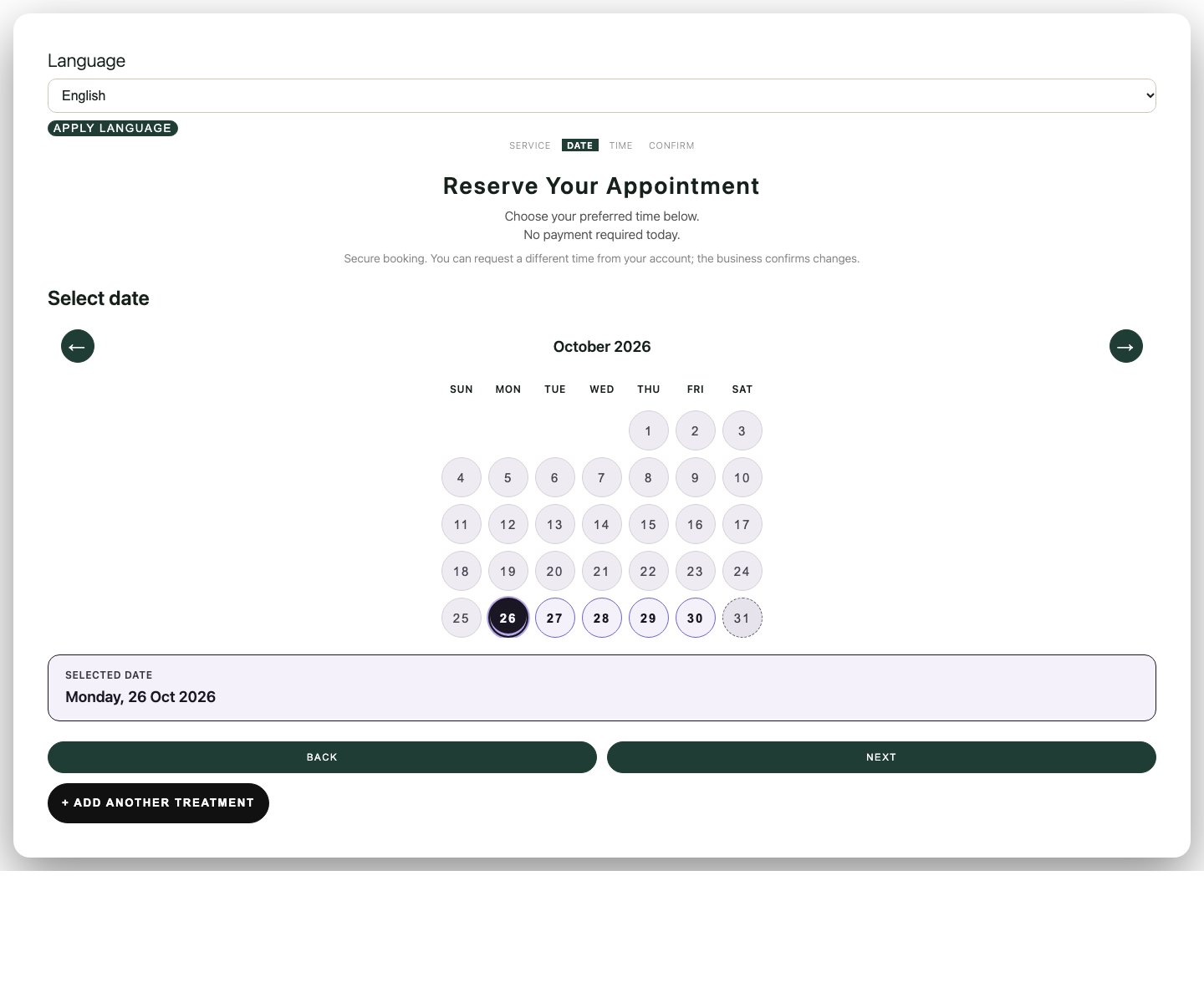
| Select date | A working day. One capture shows Monday, 26 Oct 2026. | A separate example, not the confirmed visit. |
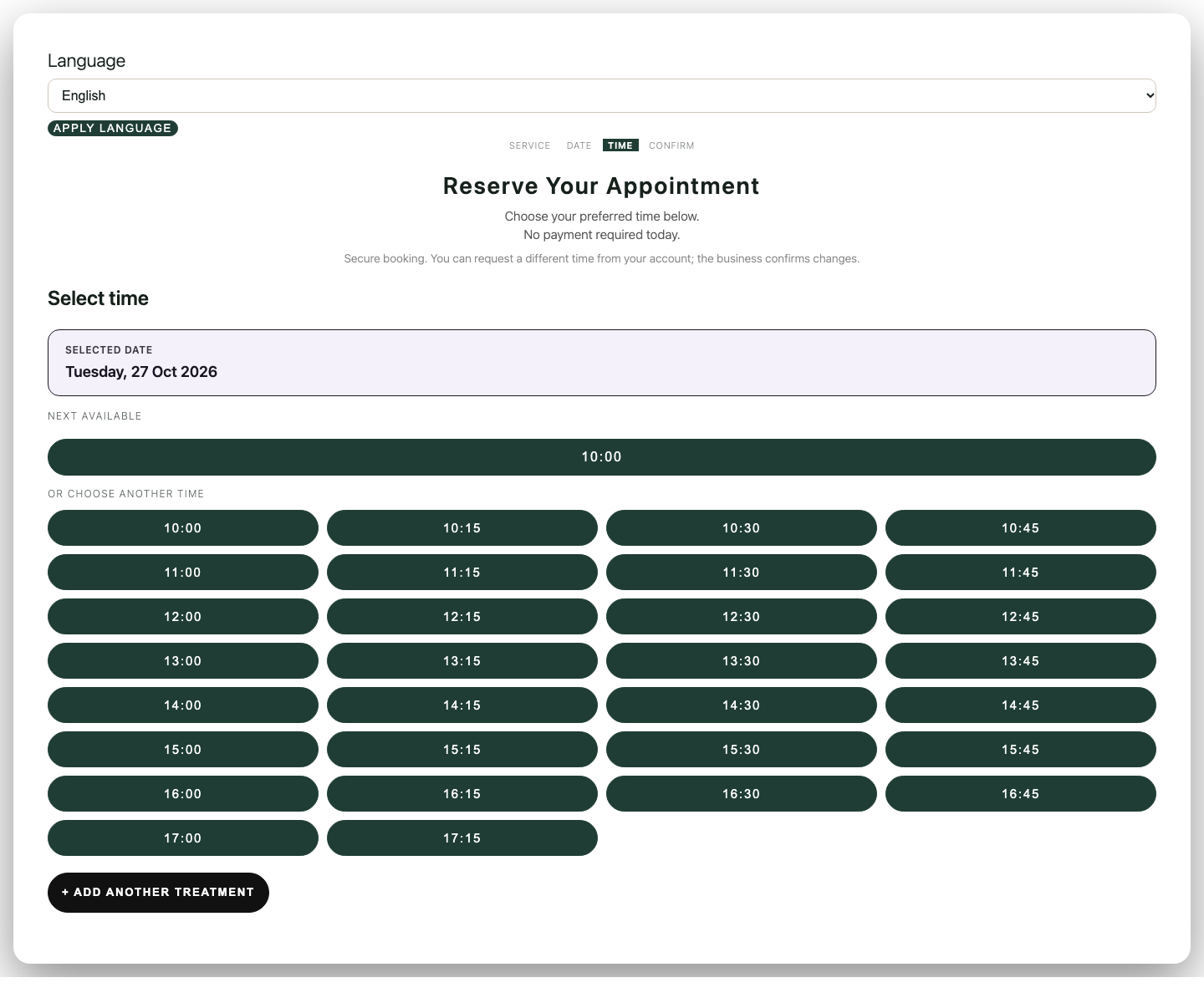
| Select time | One capture shows Tuesday, 27 Oct 2026, starts from 10:00 to 17:15. | Another separate example. |
Action. Choose the category, press Add, continue, choose a date, press Next, then choose a time.
Saved result. The page can show a selected service, date, and time while the visitor is still signed out. That is not a confirmation.
Reload check. Refresh before confirming. You may need to choose the time again. These instructional captures were not one saved attempt.
Safe recovery. If no times appear, check Team & availability for that weekday. The No times available message offers Book another day and Join the waitlist for this day. Waitlist mail was not tested.
Confirm with a prepared signed-in customer
- Role
- Prepared signed-in customer
- Prerequisites
- The prerequisite above. The visitor is signed in. Guest booking is off.
- Menu path
- Booking page → review step, signed in.
Field reference
| Field | Example | What it does |
|---|---|---|
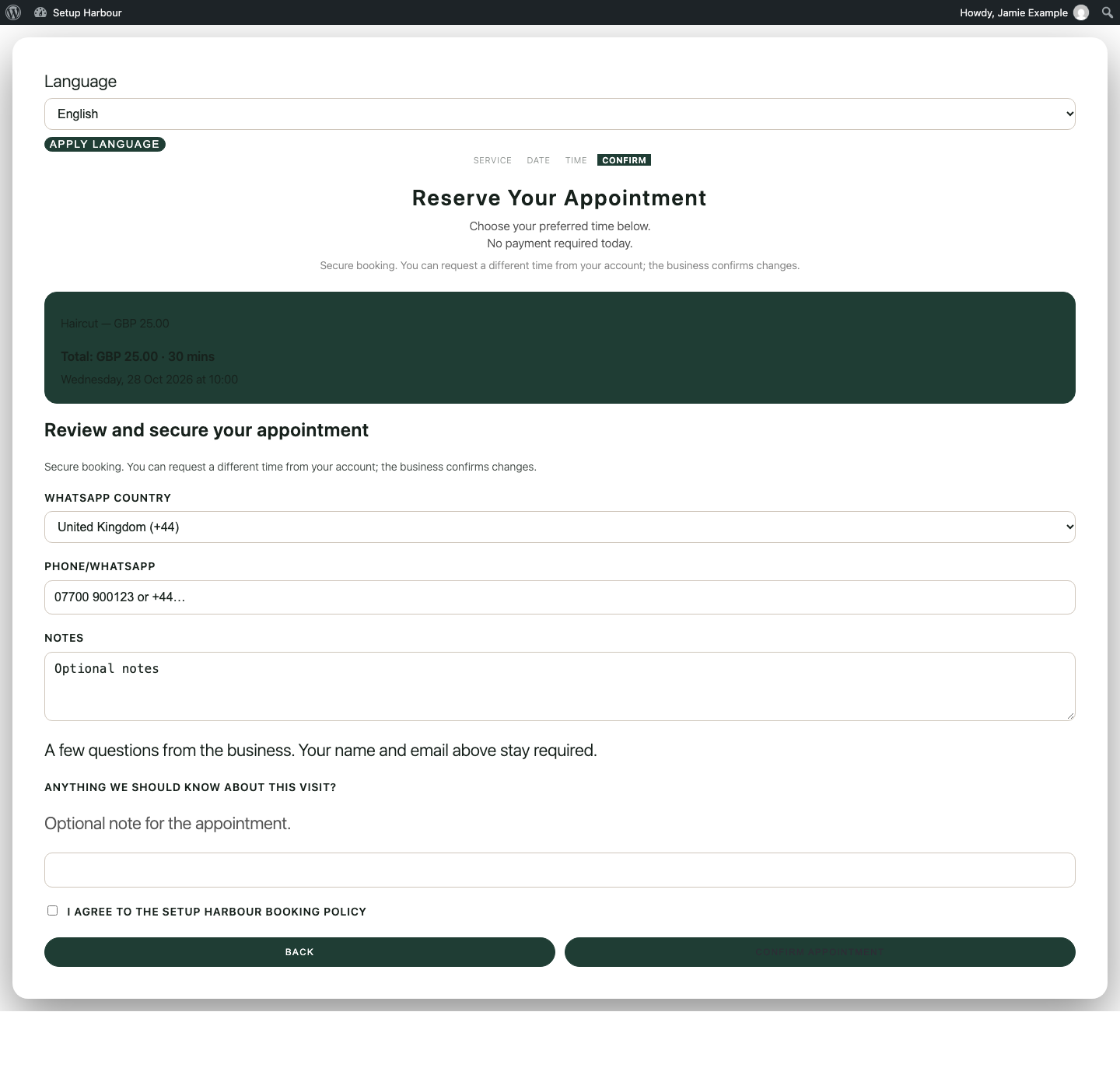
| WhatsApp country | United Kingdom (+44) for a UK number | The number is checked for that country. |
| Phone/WhatsApp | A number the application accepts for the selected country | An unacceptable number shows “Please enter a valid WhatsApp or phone number.” and does not store the visit. |
| Notes | Optional | Not the published question. |
| Anything we should know about this visit? | Optional note for the appointment. | The published question. |
| I agree to the Setup Harbour booking policy | Tick it | Confirm appointment stays unavailable until a time is selected and this box is ticked. |
Action. Tick the policy box. Press Confirm appointment only after it can be pressed.
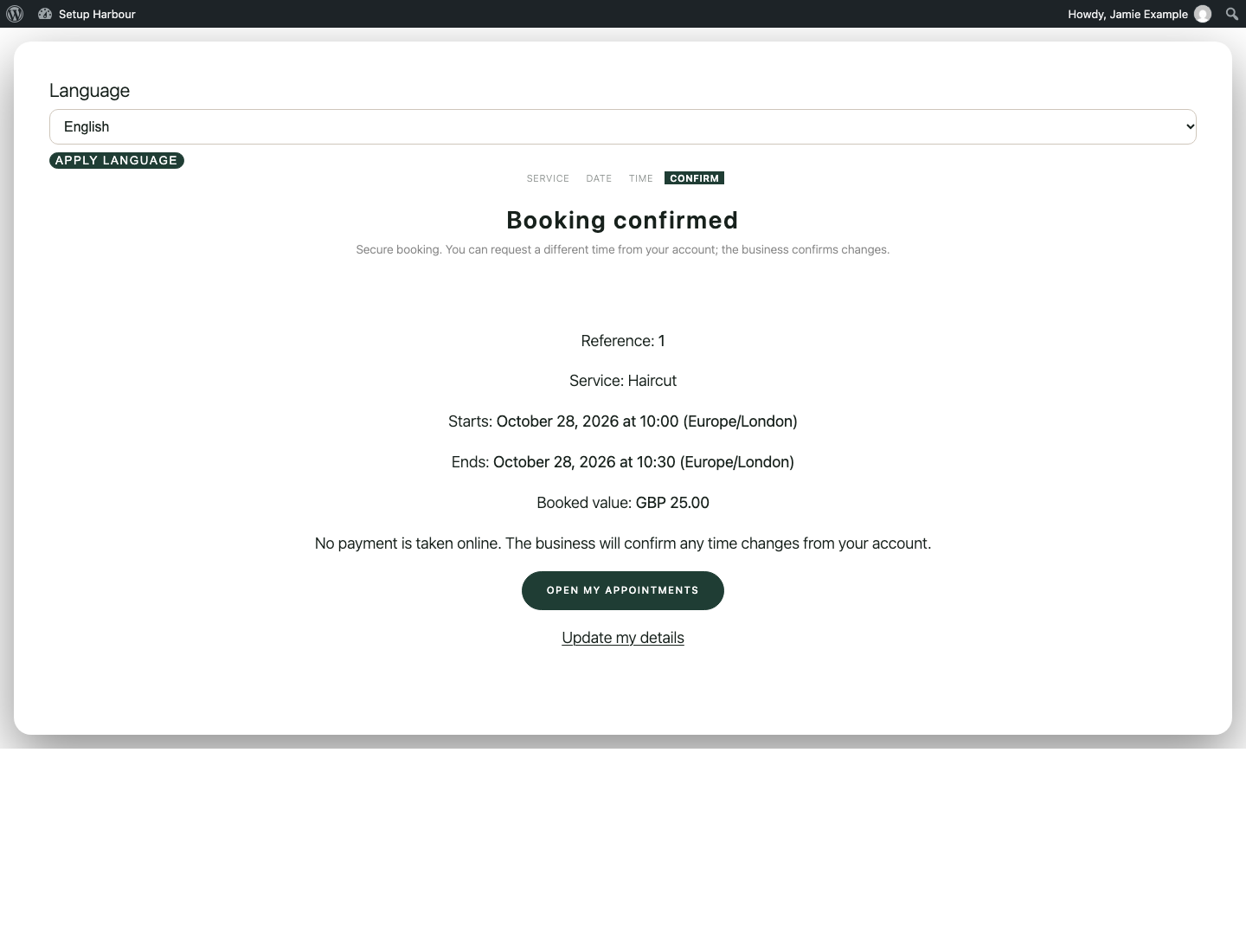
Saved result. The 28 October selection then read Booking confirmed, Reference 1, Haircut, starts October 28, 2026 at 10:00 (Europe/London), ends 10:30, booked value GBP 25.00. No payment is taken online.
Reload check. Open my appointments from the confirmation. The visit remains. The review picture was taken before the policy box was ticked; the confirmation picture is the later result.
Safe recovery. If the phone message appears, change the country or the number and press Confirm appointment again. The visit is not stored on that failure.
Match the visit as the owner
- Role
- Business owner
- Prerequisites
- The confirmation reference exists. On this fixture it was reference 1.
- Menu path
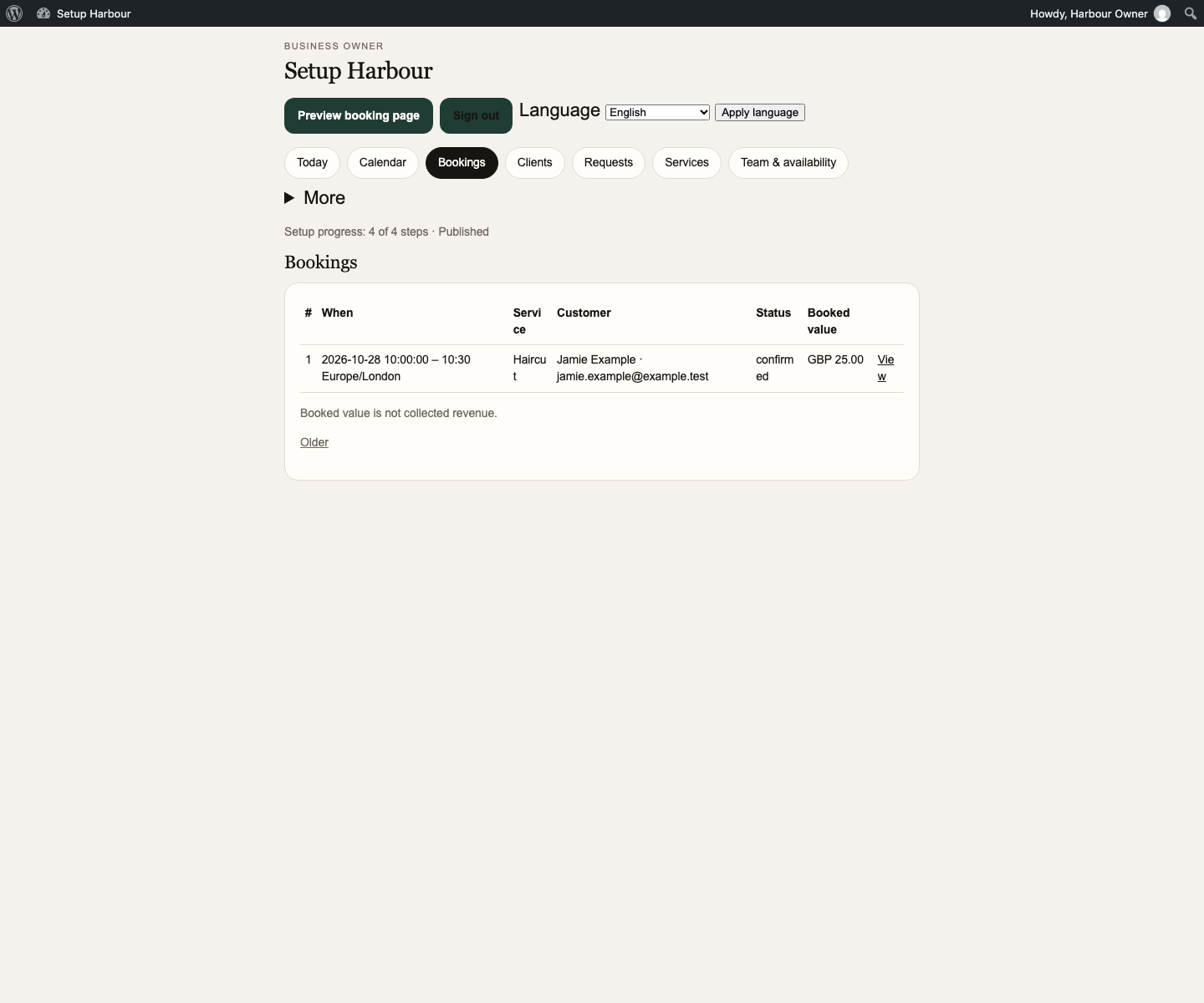
- Booking owner → Bookings
Action. Open Bookings and find the same start and service.
Saved result. Row 1 was 2026-10-28 10:00:00 – 10:30 Europe/London, Haircut, status confirmed, booked value GBP 25.00. The page says booked value is not collected revenue.
Reload check. Reload Bookings. The same row remains. View opens that visit.
Safe recovery. If the visit is not visible in the owner list, retain its confirmation reference and check the business, date range, timezone, filters, and viewing permissions that apply. A missing list row does not prove that confirmation failed. Do not create another appointment solely to make a row appear. If the mismatch remains, ask support to reconcile the stored appointment with the confirmation before repeating the booking. Do not mark readiness from the customer calendar alone.
Readiness
- Role
- Business owner
- Prerequisites
- The rows below, including the new-customer limit.
- Menu path
- Booking owner → Today, Services, Team & availability, and Bookings.
Action. Check each line. A visible menu is not a pass.
Saved result. Published, Haircut bookable, Harbour Barber on Monday to Friday 10:00–18:00, one confirmed visit matched on Bookings, and no online payment taken.
Reload check. Sign out. The booking page still shows the service. New customers still cannot confirm while guest booking is off and Create account is absent.
Safe recovery. Do not announce new-customer booking until guest confirmation or account creation has been retested. Do not describe booked value as money collected.